Quick onboard
Deployment
Data Modeling
Connecting
Migration
Query
Operations and Maintenance
Common Maintenance
Partition
Backup and Restore
Expansion
Mirroring
Resource Management
Security
Monitoring
Performance Tuning
Troubleshooting
Reference Guide
Tool guide
Data type
Storage Engine
Executor
Stream
DR (Disaster Recovery)
Configuration
Index
Extension
SQL Reference
MatrixGate 4.3 introduces a migration mode that enables high-speed data transfer from other Greenplum 5, Greenplum 6, or MatrixDB clusters into the current MatrixDB cluster.
High-speed migration allows data to bypass the master node. Data is read directly from the source cluster's segments, forwarded through mxgate, and sent directly to the target cluster's segments. This eliminates the master node as a single-point bottleneck. The number of segments in the source and target clusters can differ.
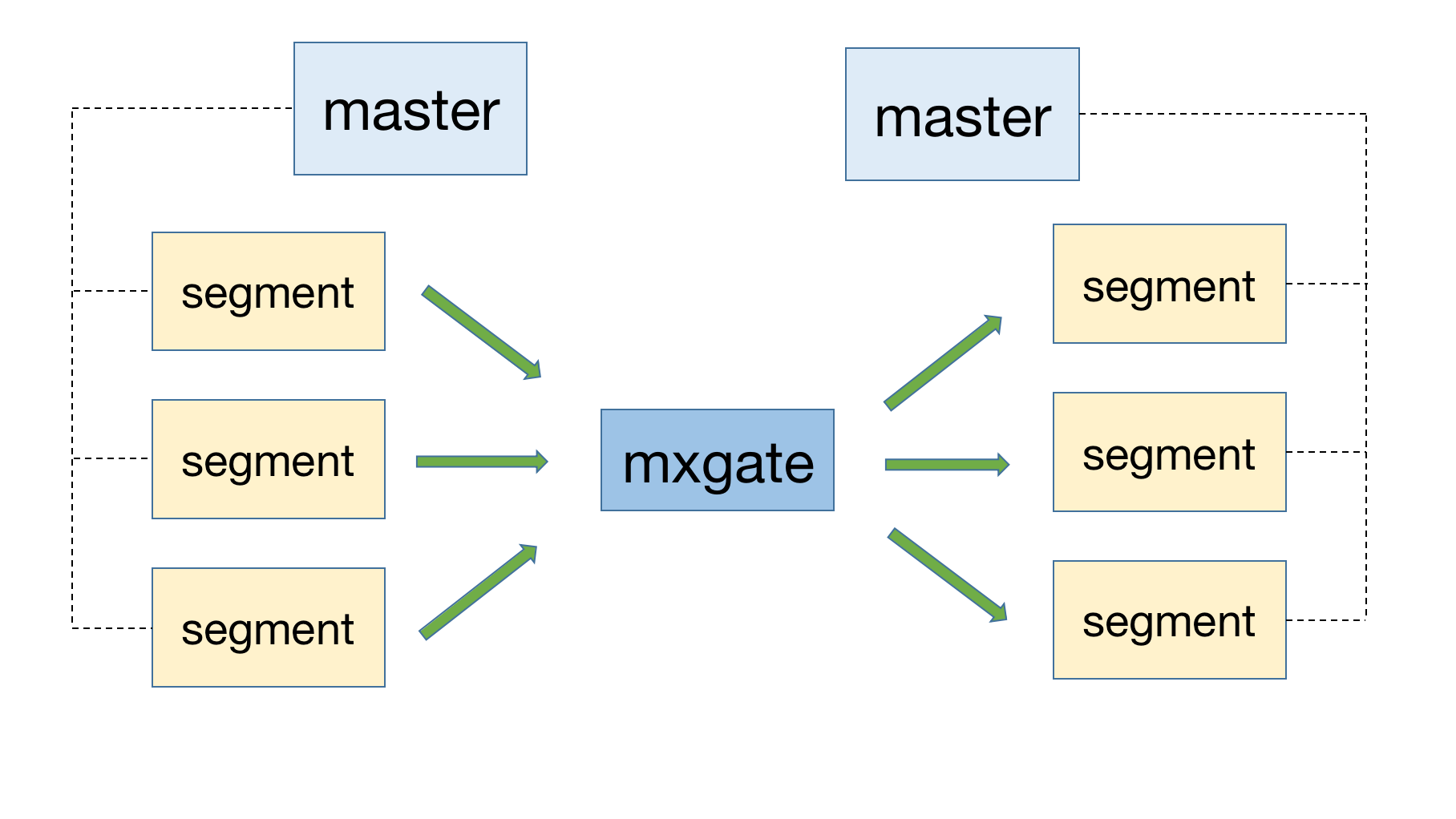
Full table migration transfers all data from a source table. Example usage:
mxgate --source transfer \
         --src-host 172.31.41.7 \
         --src-port 5432 \
         --src-db postgres \
         --src-user ec2-user \
         --src-password abc \
         --src-schema public \
         --src-table trans_ao \
         --compress "gzip" \
         --port-base 9129 \
         --local-ip 172.31.33.128 \
         --db-database ttt \
         --target public.trans_ao \
         --format text \
         --time-format raw \
         --use-auto-increment=false
Parameters:
| Parameter | Description |
|---|---|
| --source | Functional entry point; must be set to 'transfer' |
| --src-host | IP address of the source cluster's master |
| --src-port | Port number of the source cluster's master |
| --src-user | Username for connecting to the source database (superuser is recommended) |
| --src-password | Connection password |
| --src-schema | Schema name of the source table |
| --src-table | Name of the source table |
| --compress | Data transfer compression method from source segment hosts: Empty string "": no compression, plain text transfergzip: use gzip compression; requires the gzip command installed on source segment hostslz4: use lz4 compression; requires the lz4 command installed on source segment hostsRecommended order: lz4 > gzip > no compression |
| --port-base | Range of ports used during transfer, starting from 9129 |
| --local-ip | IP address that the source cluster can reach; must be accessible from the source |
| --db-database | Target database name where the destination table resides |
| --target | Target table name, in the format <schema>.<table>; if schema is omitted, defaults to public |
| --format | text or csv. Use csv only when data contains complex strings (e.g., newlines, quotes, delimiters). Otherwise, prefer text |
| --time-format | Must be set to raw in transfer mode |
| --use-auto-increment | By default, mxgate skips serial auto-increment columns in the target table. Use this option to disable that behavior |
Another use of migration mode is to quickly export data to files:
mxgate --source transfer \
         --src-host 172.31.41.7 \
         --src-port 5432 \
         --src-db postgres \
         --src-user ec2-user \
         --src-schema public \
         --src-table trans_ao_1 \
         --compress "lz4" \
         --port-base 9129 \
         --local-ip 172.31.33.128 \
         --save-to-dir /tmp/receive/ \
         --db-database ttt \
         --transform nil \
         --writer nil \
         --target trans_ao
Use the --save-to-dir parameter to specify the file storage path.
Note: Even when exporting to files, you must provide
--db-databaseand--targetto specify the target database and table, and the target database and table must exist.
Filtered migration allows specifying an SQL query via the --src-sql parameter to filter data for synchronization. This works for both table-to-table and table-to-file migrations:
mxgate --source transfer \
         --src-host 172.31.41.7 \
         --src-port 5432 \
         --src-db postgres \
         --src-user ec2-user \
         --src-sql "select * from demo where c1 = 'xxxx'" \
         --compress "lz4" \
         --port-base 9129 \
         --local-ip 172.31.33.128 \
         --save-to-dir /tmp/receive/ \
         --db-database ttt \
         --transform nil \
         --writer nil \
         --target trans_ao
For detailed information about relational migration tools, refer to mxbackup and mxrestore.


