datainspect is a built-in storage diagnostic tool in MARS2 that provides low-level data insights to precisely optimize data storage and query performance.
Storage optimization requires understanding the actual content of data in physical files. Similar to PostgreSQL's Pageinspect, you can use datainspect to easily extract data segments from MARS2 physical storage for further analysis.
Additionally, datainspect integrates relevant indexes and metadata in MARS2 to provide basic information such as NULL distribution and min/max values, aiding in I/O scan optimization.
Note!
This tool applies only to MARS2 tables.
datainspect consists of system functions built into MARS2 and becomes available after MARS2 is properly installed. MARS2 tables depend on the matrixts time-series extension. Before creating tables, you must first create this extension in the database where the MARS2 storage engine will be used.
Note!
Thematrixtsextension is database-scoped. Create it once per database; do not recreate it repeatedly.
=# CREATE EXTENSION matrixts;First, create a test table named tb1 for demonstration purposes. The following sections introduce four related functions using this table.
=# CREATE TABLE tb1(
    f1 int8 encoding(minmax),
    f2 int8 encoding(minmax),
    f3 float8 encoding(minmax),
    f4 text
) USING MARS2
WITH (compresstype=lz4);
Create a MARS2 index:
=# CREATE INDEX ON tb1 USING mars2_btree(f1);Insert 24,000 test records:
=# INSERT INTO tb1 SELECT
            generate_series(1, 24000),
            mod((random()*1000000*(generate_series(1, 1200)))::int8, (random()::int8/100 + 100)),
            (random() * generate_series(1, 24000))::float8,
(random() * generate_series(1, 24000))::text;The desc_ranges function integrates low-level MARS2 metadata and indexes to provide information such as min/max index values and null value statistics. It also supports precise monitoring of physical storage space usage.
Syntax
SELECT <* / column1,column2,...> FROM matrixts_internal.desc_ranges(<'tablename'>)Parameters
| Field | Description | Required |
|---|---|---|
| tablename | Table name; for partitioned tables, use the parent table name | Yes |
| Field | Description |
|---|---|
| segno | Segment number, starting from 0 |
| attno | Attribute number (column index), starting from 0 |
| forkno | Physical file fork number. A low-level database identifier corresponding to a specific file. Starts from the first fork by default. |
| offno | Byte offset of the RANGE within the physical file, starting from 0. In MARS2, data is stored in batches. Each batch forms a storage RANGE based on the configured compress_threshold (compression threshold), with its position identified by the byte offset. |
| nbytes | Actual space occupied by the RANGE in bytes |
| nrows | Value set at table creation for compress_threshold, defaulting to 1200. This refers to the compression threshold, which controls how many tuples are compressed together — the maximum number of tuples in one compression unit. |
| nrowsnotnull | Number of non-null entries in the RANGE |
| mmin | Minimum value in the RANGE if the column supports minmax indexing; otherwise NULL |
| mmax | Maximum value in the RANGE if the column supports minmax indexing; otherwise NULL |
=# SELECT attno, sum(nbytes)/1024 as "Size in KB"
    FROM matrixts_internal.desc_ranges('tb1') GROUP BY attno ORDER BY attno;
 attno |      Size in KB
-------+----------------------
     0 |  94.9062500000000000
     1 |   7.8203125000000000
     2 | 187.3437500000000000
     3 | 386.3515625000000000
(4 rows)=# SELECT * FROM matrixts_internal.desc_ranges('tb1') WHERE segno = 1;
segno | attno | forkname | forkno | offno | nbytes | nrows | nrowsnotnull | mmin | mmax
-------+-------+----------+--------+--------+--------+-------+--------------+--------------------+--------------------
1 | 0 | data1 | 304 | 0 | 4848 | 1200 | 1200 | 15 | 7240
1 | 1 | data1 | 304 | 16376 | 856 | 1200 | 199 | 0 | 99
1 | 2 | data1 | 304 | 17712 | 9072 | 1200 | 1200 | 1.4602231817218758 | 704.8010557110921
1 | 3 | data1 | 304 | 50024 | 20272 | 1200 | 1200 | NULL | NULL
1 | 0 | data1 | 304 | 4848 | 4856 | 1200 | 1200 | 7243 | 14103
1 | 1 | data1 | 304 | 17232 | 160 | 1200 | 0 | NULL | NULL
1 | 2 | data1 | 304 | 26784 | 9760 | 1200 | 1200 | 705.0931003474365 | 1372.9018354549075
1 | 3 | data1 | 304 | 70296 | 19680 | 1200 | 1200 | NULL | NULL
1 | 0 | data1 | 304 | 9704 | 4856 | 1200 | 1200 | 14125 | 21417
1 | 1 | data1 | 304 | 17392 | 160 | 1200 | 0 | NULL | NULL
1 | 2 | data1 | 304 | 36544 | 9760 | 1200 | 1200 | 1375.043496121433 | 2084.906658862494
1 | 3 | data1 | 304 | 89976 | 19792 | 1200 | 1200 | NULL | NULL
1 | 0 | data1 | 304 | 14560 | 1816 | 445 | 445 | 21429 | 23997
1 | 1 | data1 | 304 | 17552 | 160 | 445 | 0 | NULL | NULL
1 | 2 | data1 | 304 | 46304 | 3720 | 445 | 445 | 2086.0748374078717 | 2336.065046118657
1 | 3 | data1 | 304 | 109768 | 7576 | 445 | 445 | NULL | NULL
(16 rows)The show_range function reads a specified segment of physical data from MARS2 and presents it in human-readable format. Currently supported data types include: int2, int4, int8, float4, float8, timestamp, date, and text.
Syntax
SELECT <* / column1,column2,...> FROM matrixts_internal.show_range(
 tablename text,
 attno int4,
 forkno int4,
 offno int4,
 nbytes int4
)
Parameters
| Field | Description | Required |
|---|---|---|
| tablename | Table name; for partitioned tables, use the parent name | Yes |
| attno | Column index, numbered sequentially from 0 when defining the table |
Yes |
| forkno | Physical file fork number | Yes |
| offno | Byte offset of the data in the physical file | Yes |
| nbytes | Actual size in bytes occupied by the data | Yes |
Note!
Refer to the return fields of thedesc_rangesfunction above for details on these parameters.
| Field | Description |
|---|---|
| rowno | Row number. This is relative to the current RANGE, not an absolute table-wide offset. |
| val | Actual data value |
Note!
Displayed floating-point values may have precision errors (val).
=# SELECT * FROM matrixts_internal.show_range('tb1', 1, 304, 16176, 808) LIMIT 20;
 rowno | val
-------+-----
     1 | 4
     2 | 36
     3 | 81
     4 | 58
     5 | 17
     6 | 75
     7 | 11
     8 | 84
     9 | 60
    10 | 78
    11 | 69
    12 | 0
    13 | 87
    14 | 40
    15 | 72
    16 | 58
    17 | 17
    18 | 48
    19 | 70
    20 | 6
(20 rows)The dump_range function decompresses selected physical data from MARS2 and exports it to a binary file for secondary analysis.
Syntax
=# SELECT <* / column1,column2,...> FROM matrixts_internal.dump_ranges(
tablename text,
attno int4,
outfile text,
forkno int4,
offno int4,
limits int4
);
Parameters
| Field | Description | Required |
|---|---|---|
| tablename | Table name; for partitioned tables, use the parent name | Yes |
| attno | Column index | Yes |
| outfile | Output filename. After export, each Segment appends a unique suffix. For example, if the file is named tb1-f2.bin, on Segment1 it appears as tb1-f2.bin-seg1 |
Yes |
| forkno | Physical file fork number | No |
| offno | Byte offset of the data in the physical file | No |
| limits | Default is 100. Limits the number of RANGES exported, starting from the position defined by forkno and offno |
No |
Note!
Thelimitsparameter restricts the number of RANGES exported per Segment.
Note!
See the returned fields of thedesc_rangesfunction for more information on these parameters.
Returns
nbytes: Amount of data exported from each Segment node, in bytes.Example
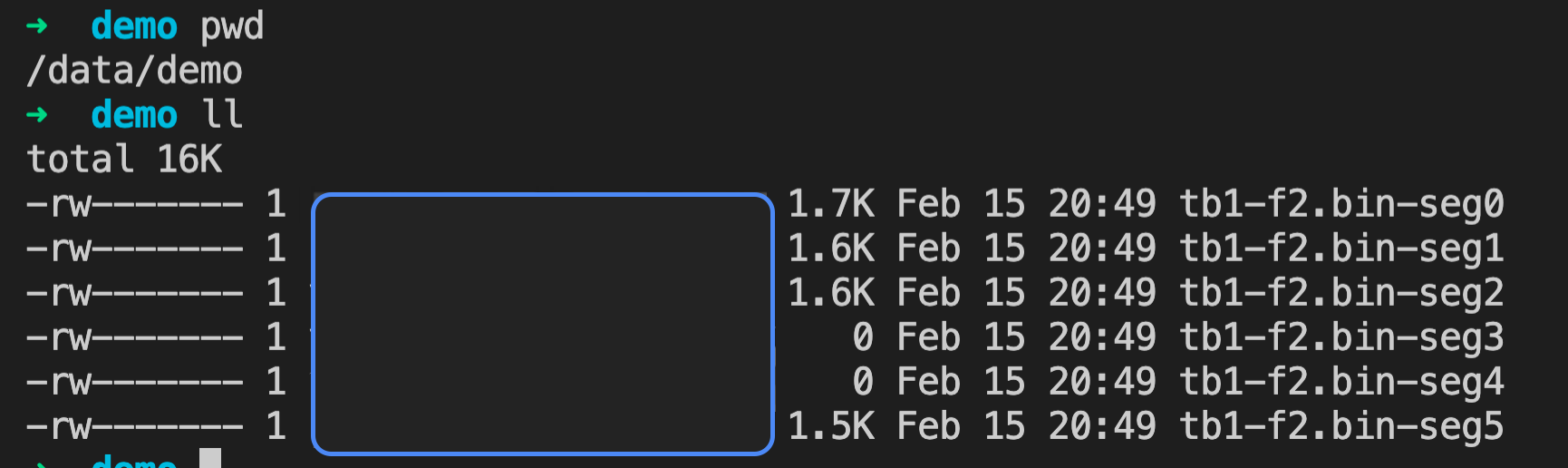
=# SELECT * FROM matrixts_internal.dump_ranges('tb1', 1, '/data/demo/tb1-f2.bin', 304, 16176, 1) LIMIT 20;
 nbytes
--------
      0
      0
   1480
   1632
   1704
   1592
(6 rows)
In this example, six results are returned because the export runs independently on each Segment. Each row represents the result from one Segment. Two rows show nbytes as 0, indicating no matching data on those Segments.
After execution, each host running a Segment generates a binary file with a unique suffix appended to the original filename (.-seg<no>).
The desc_compress function compares two user-specified compression algorithms on a contiguous segment of physical data in a MARS2 columnar store.
Syntax
=# SELECT <* / column1,column2,...> FROM matrixts_internal.desc_compress(
tablename text,
attno int4,
<method1> text,
<method2> int4,
forkno int4,
offno int4,
limits int4
);
Parameters
| Field | Description | Required |
|---|---|---|
| tablename | Table name; for partitioned tables, use the parent name | Yes |
| attno | Column index | Yes |
| Compression Method 1 | e.g., zstd, lz4, deltadelta, etc. | Yes |
| Compression Method 2 | e.g., zstd, lz4, deltadelta, etc. | Yes |
| forkno | Physical file fork number | No |
| offno | Byte offset of the data in the physical file | No |
| limits | Default is 100. Number of RANGES to evaluate, starting from the position defined by forkno and offno |
No |
| Field | Description |
|---|---|
| segno | Segment number, starting from 0 |
| attno | Attribute number (column index), starting from 0 |
| forkno | Physical file fork number |
| offno | Byte offset of the RANGE in the physical file, starting from 0. See description in desc_ranges. |
| nbytes | Actual space occupied by the RANGE in bytes |
| nrows | Value of compress_threshold, default 1200. Refers to the compression threshold — max number of tuples per compression unit. |
| nrowsnotnull | Number of non-null entries in the RANGE |
| mmin | Minimum value in the RANGE if minmax indexing is supported; otherwise NULL |
| mmax | Maximum value in the RANGE if minmax indexing is supported; otherwise NULL |
| decompresstime0 | Time to decompress using the original algorithm, in CPU cycles |
| compressedsize1 | Size in bytes when compressing with <method1> |
| compressedtime1 | Time to compress using <method1>, in CPU cycles |
| selectiontime1 | If <method1> is adaptive encoding (Auto), this is the time spent analyzing data characteristics (CPU cycles) |
| decompressedtime1 | Time to decompress using <method1>, in CPU cycles |
| iscompressible1 | Whether compression with <method1> is effective. If the compressed size is close to or larger than the original, compression is not recommended. |
| dataloss1 | Whether precision loss occurs when compressing with <method1> |
| compressedsize2 | Size in bytes when compressing with <method2> |
| compressedtime2 | Time to compress using <method2>, in CPU cycles |
| selectiontime2 | If <method2> is adaptive encoding, this is the time spent analyzing data characteristics (CPU cycles) |
| decompressedtime2 | Time to decompress using <method2>, in CPU cycles |
| iscompressible2 | Whether compression with <method2> is effective |
| dataloss2 | Whether precision loss occurs when compressing with <method2> |
lz4 compression method. Use desc_compress to analyze which algorithm achieves better compression ratio on column f1.=# SELECT compressedsize1,compressedsize2,dataloss1,dataloss2,compressedtime1,compressedtime2,iscompressible1,iscompressible2
FROM matrixts_internal.desc_compress(
'tb1', 0, 'lz4', 'deltadelta') limit 10;
compressedsize1 | compressedsize2 | dataloss1 | dataloss2 | compressedtime1 | compressedtime2 | iscompressible1 | iscompressibl
e2
-----------------+-----------------+-----------+-----------+-----------------+-----------------+-----------------+--------------
---
4835 | 975 | NO | NO | 275976 | 171902 | YES | YES
4848 | 1041 | NO | NO | 241742 | 111632 | YES | YES
4843 | 995 | NO | NO | 161580 | 123520 | YES | YES
4843 | 976 | NO | NO | 180704 | 118966 | YES | YES
4846 | 1009 | NO | NO | 157268 | 123994 | YES | YES
4844 | 1025 | NO | NO | 93118 | 70050 | YES | YES
4846 | 1018 | NO | NO | 91896 | 64120 | YES | YES
4843 | 997 | NO | NO | 89732 | 64062 | YES | YES
4845 | 1013 | NO | NO | 95010 | 71106 | YES | YES
4561 | 975 | NO | NO | 84664 | 82220 | YES | YES
(10 rows)The output shows comparison metrics for each RANGE in the selected data segment. Clearly, the deltadelta algorithm achieves significantly higher compression ratios on column f1 compared to lz4, while also requiring less compression time. Therefore, using deltadelta instead of lz4 on column f1 is clearly the better choice.


