MatrixGate, abbreviated as mxgate, is a high-performance streaming data loading server located at bin/mxgate in the MatrixDB installation directory. Currently, MatrixGate supports data ingestion via HTTP and STDIN interfaces, with support for TEXT and CSV data formats.
The data loading logic of MatrixGate is illustrated below:
mxgate) in concurrent micro-batches. mxgate process communicates efficiently with the MatrixDB master process to exchange transaction and control information. 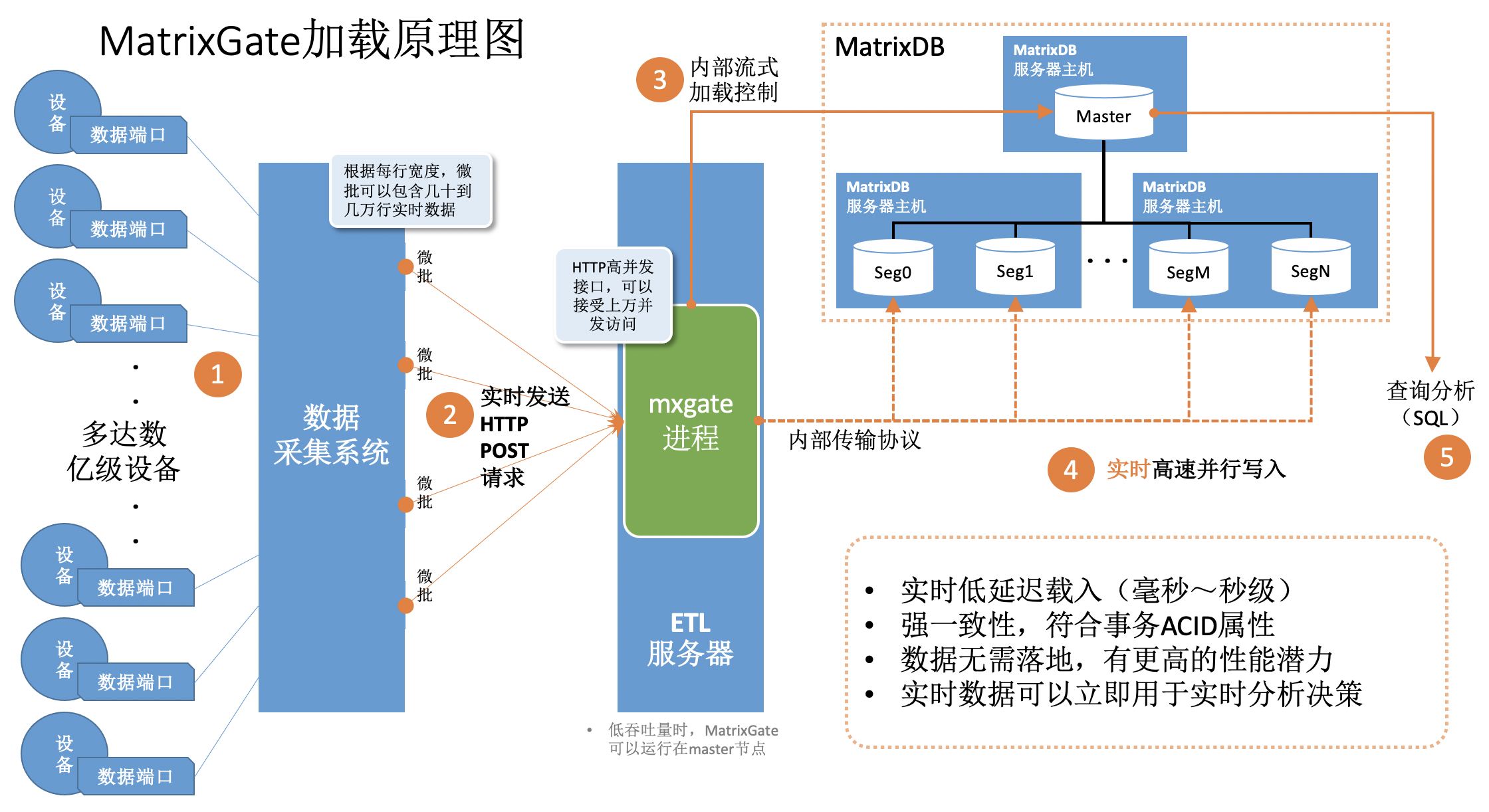
mxgate config --db-database demo --target public.testtable --target public.testtable2 --allow-dynamic > mxgate.confThis command generates a configuration file named mxgate.conf. It allows users to customize data loading behavior for testtable and testtable2, while also supporting default global settings for loading into other tables.
mxgate.conf file as needed (e.g., set field delimiters). Skip this step if using defaults. The generated configuration includes entries like: [[job.target]]
# delimiter = "|"
# exclude-columns = []
# format = "text"
name = "job_text_to_public.testtable"
# null-as = ""
table = "public.testtable"
# time-format = "unix-second"
# use-auto-increment = true
[[job.target]]
# delimiter = "|"
# exclude-columns = []
# format = "text"
name = "job_text_to_public.testtable2"
# null-as = ""
table = "public.testtable2"
# time-format = "unix-second"
# use-auto-increment = trueIf testtable uses @ as delimiter and testtable2 uses %, update the config accordingly:
    [[job.target]]
      delimiter = "@"
      # exclude-columns = []
      # format = "text"
      name = "job_text_to_public.testtable"
      # null-as = ""
      table = "public.testtable"
      # time-format = "unix-second"
      # use-auto-increment = true

    [[job.target]]
      delimiter = "%"
      # exclude-columns = []
      # format = "text"
      name = "job_text_to_public.testtable2"
      # null-as = ""
      table = "public.testtable2"
      # time-format = "unix-second"
      # use-auto-increment = true
By default, mxgate listens on port 8086. This can be seen in the mxgate.conf under [source.http]:
[source]

  ## Source plugin is the data entrance to MatrixGate
  ## Types restricted to: http
  source = "http"

  [source.http]

    ## Port of http push
    # http-port = 8086

    ## Maximum request body size (after gzip)
    ## The server rejects requests with bodies exceeding this limit.
    # max-body-bytes = 4194304

    ## The maximum number of concurrent HTTP connections to the server
    ## The server response with 503 after exceed this limit.
    # max-concurrency = 40000
You may change the port number if necessary.
demo database to prepare for data loading:mxgate start --config mxgate.confmxgate statusmxgate stopTo force stop in case of timeout or other issues:
mxgate stop --force| Parameter | Default Value | Description |
|---|---|---|
--db-database |
postgres | Database name that MatrixGate connects to in MatrixDB |
--db-master-host |
localhost hostname | Hostname of the MatrixDB master node |
--db-master-port |
5432 | Port number of the MatrixDB master node |
--db-user |
current OS username | Username used by MatrixGate to connect to MatrixDB Note: This user must have permission to create external tables. For non-superusers, grant privileges using: alter user {username} CREATEEXTTABLE; |
--db-password |
empty | Password for the MatrixDB user |
--db-max-conn |
10 | Maximum number of connections from MatrixGate to MatrixDB |
--interval |
100 milliseconds | Interval at which MatrixGate performs batch data loads |
--source |
http | Data source type; supports http and stdin |
--target |
schemaName.tableName | Target table name. Schema name is optional and defaults to public. Multiple tables can be specified using multiple --target options. If not provided, use --allow-dynamic to allow dynamic table resolution based on incoming data. |
--allow-dynamic |
false | When set to true, enables dynamic mapping of POST data to target tables based on the first line of input. Use only when target tables are not known at startup. For fixed targets, explicitly specify with --target. |
--format |
text | Input data format: text or csv. text is faster but does not support newlines within fields. csv is more flexible; string fields must be enclosed in double quotes. |
--delimiter |
| | Character used to separate columns within each row |
--null-as |
empty string | String representing NULL values. Default is an unquoted empty string. If a column has NOT NULL constraint and receives a null value, loading fails. To use \N as null, escape the backslash: --null-as \\N |
--time-format |
unix-second | Timestamp unit: unix-second, unix-ms, unix-nano, or raw.MatrixGate assumes the first column is a Unix timestamp and converts it to database time format. Use raw if timestamp is not in the first column or already formatted. |
--use-auto-increment |
true | Whether to skip auto-increment columns during load and use system-generated values |
--exclude-columns |
empty | List of columns to exclude during load. Remaining columns must match table definition order. Auto-increment columns skipped via --use-auto-increment do not need to be listed here. |
--upsert-key |
empty | Key(s) for upsert operations. The target table must have a UNIQUE constraint, and all constraint keys must be specified. |
--help |
— | Display usage and parameter list |
MatrixGate provides an HTTP API allowing data ingestion into MatrixDB from any programming language.
| Protocol Type | Format | Usage and Example |
|---|---|---|
| URL | http://mxgate-host:port |
Address to connect to mxgate |
| PATH | / |
Only root path / is supported; any suffix is ignored |
| HTTP Method | POST | Only POST method is supported |
| HTTP Header | Content-Encoding: gzip |
Supports gzip compression of request body |
Content-Type: text/plain |
Only text/plain is supported |
|
| HTTP Body | SchemaName.TableNameTimestamp\|ID\|C1\|C2\|...\|Cn |
First line specifies the target table. Schema name is optional (defaults to public). Subsequent lines contain time-series data. Each line corresponds to one row in the target table, with columns separated by | and rows by \n. The first field is a Unix timestamp in seconds (see --time-format). Second field is TagID (integer). Remaining fields correspond to table columns. It is recommended that the target table DDL follows the column order: (Timestamp, TagID, C1, C2, ..., Cn) |
| Response Code | Meaning | Notes |
|---|---|---|
| 204 | StatusNoContent | Data successfully ingested into MatrixGate |
| 400 | StatusBadRequest | Bad request: e.g., malformed POST body, table not found, content encoding mismatch |
| 405 | StatusMethodNotAllowed | Request method is not POST |
| 500 | StatusInternalServerError | Database-side error; load failed. Response body contains detailed error message |
| 503 | StatusServiceUnavailable | MatrixGate refuses request: e.g., exceeds max connections, shutting down |
testtable in the demo database:CREATE TABLE testtable (time TIMESTAMP WITH TIME ZONE, tagid INT, c1 INT, c2 INT, c3 INT)
DISTRIBUTED BY (tagid);data.txt:public.testtable
1603777821|1|101|201|301
1603777822|2|102|202|302
1603777823|3|103|203|303mxgate --config mxgate.confcurl http://localhost:8086/ -X POST -H 'Content-Type: text/plain' --data-binary "@data.txt"demo=# SELECT extract(epoch FROM "time"), * FROM testtable;
date_part | time | tagid | c1 | c2 | c3
------------+------------------------+-------+-----+-----+-----
1603777821 | 2020-10-27 13:50:21+08 | 1 | 101 | 201 | 301
1603777822 | 2020-10-27 13:50:22+08 | 2 | 102 | 202 | 302
1603777823 | 2020-10-27 13:50:23+08 | 3 | 103 | 203 | 303
(3 rows)import java.io.BufferedReader;
import java.io.DataOutputStream;
import java.io.InputStreamReader;
import java.net.HttpURLConnection;
import java.net.URL;
public class MxgateExample {
public static void main(String[] args) throws Exception {
MxgateExample http = new MxgateExample();
http.sendingPostRequest();
}
// HTTP Post request
private void sendingPostRequest() throws Exception {
// mxgate listens on port 8086 of localhost
String url = "http://localhost:8086/";
URL obj = new URL(url);
HttpURLConnection con = (HttpURLConnection) obj.openConnection();
// Setting basic post request
con.setRequestMethod("POST");
con.setRequestProperty("Content-Type","text/plain");
String postJsonData = "public.testtable\n1603777821|1|101|201|301\n1603777822|2|102|202|302\n1603777823|3|103|203|303";
con.setDoOutput(true);
DataOutputStream wr = new DataOutputStream(con.getOutputStream());
// Encode using UTF-8 if data contains Chinese characters
wr.write(postJsonData.toString().getBytes("UTF-8"));
wr.flush();
wr.close();
int responseCode = con.getResponseCode();
System.out.println("Sending 'POST' request to URL : " + url);
System.out.println("Post Data : " + postJsonData);
System.out.println("Response Code : " + responseCode);
BufferedReader in = new BufferedReader(new InputStreamReader(con.getInputStream()));
String output;
StringBuffer response = new StringBuffer();
while ((output = in.readLine()) != null) {
response.append(output);
}
in.close();
System.out.println(response.toString());
}
}import http.client
class MxgateExample(object):
def __init__(self):
# mxgate listens on port 8086 of localhost
self.url = "localhost:8086"
self.postData = "public.testtable\n/" \
"1603777821|1|101|201|301\n/" \
"1603777822|2|102|202|302\n/" \
"1603777823|3|103|203|303"
self.headers = {"Content-Type": "text/plain"}
# HTTP Post request
def sending_post_request(self):
conn = http.client.HTTPConnection(self.url)
conn.request("POST", "/", self.postData, self.headers)
response = conn.getresponse()
response_code = response.getcode()
print(f"Sending 'POST' request to URL : {self.url}")
print(f"Post Data : {self.postData}")
print(f"Response Code : {response_code}")
output = response.read()
print(output)
if __name__ == '__main__':
gate_post = MxgateExample()
gate_post.sending_post_request()Recommended to develop using C# Core environment
using System;
using System.IO;
using System.Net;
using System.Text;

namespace HttpPostTest
{
class Program
    {
        static void Main(string[] args)
        {
            var url = "http://10.13.2.177:8086/";
            var txt = "public.dest\n2021-01-01 00:00:00,1,a1\n2021-01-01 00:00:00,2,a2\n2021-01-01 00:00:00,3,a3";

           HttpPost(url,txt);
        }

public static string HttpPost(string url, string content){
    string result = "";
    HttpWebRequest req = (HttpWebRequest)WebRequest.Create(url);
    req.Method = "POST";
    req.ContentType = "text/plain";

    #region Add Post Parameters
    byte[] data = Encoding.UTF8.GetBytes(content);
    req.ContentLength = data.Length;
    using (Stream reqStream = req.GetRequestStream()){
        reqStream.Write(data, 0, data.Length);
        reqStream.Close();
    }
    #endregion

    HttpWebResponse resp = (HttpWebResponse)req.GetResponse();
    Stream stream = resp.GetResponseStream();
    // Get response content
    using (StreamReader reader = new StreamReader(stream, Encoding.UTF8)){
        result = reader.ReadToEnd();
        }
        return result;
    }

  }
}
If you encounter the error "error when serving connection ***** body size exceeds the given limit", increase the
max-body-bytesvalue inmxgate.conf.
package main

import (
    "bytes"
    "net/http"
)

func PostDataToServer(URL string) error {
    data := `public.testtable
1603777821|1|101|201|301
1603777822|2|102|202|302
1603777823|3|103|203|303
`
    resp, err := http.Post(URL, "application/text", bytes.NewBuffer([]byte(data)))
    if err != nil {
        return err
    }
    if resp.StatusCode != 200 {
        // Handle response body
        return nil
    }

    // Handle response body
    return nil
}

func main()  {
    err := PostDataToServer("http://127.0.0.1:8086")
    if err != nil{
        panic(err)
    }

}csvtable in the demo database:CREATE TABLE csvtable (time TIMESTAMP WITH TIME ZONE, tagid INT, c1 INT, c2 INT, c3 INT)
DISTRIBUTED BY (tagid);data.csv:1603777821|1|101|201|301
1603777822|2|102|202|302
1603777823|3|103|203|303stdin source, targeting existing csvtable, with parallelism level 2:mxgate \
--source stdin \
--db-database demo \
--db-master-host 127.0.0.1 \
--db-master-port 5432 \
--db-user mxadmin \
--time-format unix-second \
--delimiter "|" \
--target csvtable \
--parallel 2 < data.csvdemo=# SELECT * FROM csvtable ;
time | tagid | c1 | c2 | c3
------------------------+-------+-----+-----+-----
2020-10-27 05:50:23+08 | 3 | 103 | 203 | 303
2020-10-27 05:50:22+08 | 2 | 102 | 202 | 302
2020-10-27 05:50:21+08 | 1 | 101 | 201 | 301
(3 rows)create table json_test(id int, j json);1|"{""a"":10, ""b"":""xyz""}"stdin mode as example (other modes are similar):--format csv due to special characters in JSONmxgated \
--source stdin \
--db-database postgres \
--db-master-host 127.0.0.1 \
--db-master-port 7000 \
--db-user mxadmin \
--time-format raw \
--format csv \
--delimiter "|" \
--target json_test < ~/json.csvpostgres=# select * from json_test;
id | j
----+-----------------------
1 | {"a":10, "b":"xyz"}
(1 row)create table json_array_test(id int, j _json);1|"{""{\""a\"":10, \""b\"":\""xyz\""}"",""{\""c\"": 10}""}"mxgate \
--source stdin \
--db-database postgres \
--db-master-host 127.0.0.1 \
--db-master-port 7000 \
--db-user mxadmin \
--time-format raw \
--format csv \
--delimiter "|" \
--target json_array_test < ~/json_array.csvpostgres=# select * from json_array_test ;
id | j
----+---------------------------------------------
1 | {"{\"a\":10, \"b\":\"xyz\"}","{\"c\": 10}"}
(1 row)Note: Because JSON columns contain quotation marks and other special characters, the
--formatparameter must be set tocsv.


