This document describes the YMatrix-related metrics in the Grafana monitoring dashboard and provides reference alert thresholds.
Alert Level Description
Note!
For metrics without reference alert thresholds, determine and configure alert conditions based on actual circumstances.

This section displays the overall operational status of the cluster, including:
| Metric | Description | Unit | Level | Reference Alert Threshold |
|---|---|---|---|---|
| Cluster Status | Node status of the cluster, including: 0: Normal 1: No Standby 2: No Mirror 10: Data Imbalance (after a node recovery, primary-mirror roles have not been rebalanced) 11: Unsynchronized Nodes (some Mirror nodes are out of sync with their Primary) 12: Master Only (only the Master node is running, typically used during diagnostics) 20: Segment Down (unavailable Segment nodes exist; cluster is unusable) |
short | p0 | 20: Segment Down is a critical event; alert required |
| uptime | Uptime. Includes both YMatrix runtime since startup and the operating system uptime of the Master host | seconds (s) | ||
| Version | YMatrix version | |||
| Connection Status | Displays connection statistics in the database system: total connections (Total), blocked queries (Blocked), idle connections (Idle), idle in transaction (Idle in TXN) | short | ||
| Long queries | Long-running queries. Number of queries currently executing for more than 1 day | short | p3 | Alert if greater than 0, indicating extremely slow queries |
| Node Status | Status of each node, including: 0: UP (normal) 10: Switched (role switch occurred; rebalancing required) 11: Resync (synchronizing between primary and mirror) 20: Down (node down) |
short | Alert on values 11 and 20 | |
| license_expire_date | Remaining time until LICENSE expiration | seconds (s) | p3/p2 | Expiration may cause component failures; handle promptly; alert at 30 days to 15 days remaining |
| Disk Space in Use | Disk usage on Master or Segment instances | 0-1 | Alerting is recommended to be configured directly in node_exporter | |
| Available | Free disk space on Master or Segment instances | 0-1 | Alerting is recommended to be configured directly in node_exporter | |
| CPU | Host CPU utilization | 0-1 | ||
| Memory | Memory usage information | 0-1 | ||
| Load | Host load | short | ||
| Transactions | Statistics on transaction commits and rollbacks | short | Rollback threshold can be set | |
| DiskIO | Volume of data written to disk | bytes | ||
| Network | Volume of network traffic | bytes | ||
| Process | Number of processes in various states | short |

| Metric | Description | Unit | Level | Reference Alert Threshold |
|---|---|---|---|---|
| Top 10 Disk %Util | Top 10 disks by utilization | 0-1 | Recommended to configure in node_exporter | |
| Disk Throughput | Disk throughput | bytes | Recommended to configure in node_exporter | |
| Disk IOPS | Disk read/write operations (blue for read, orange for write, absolute values) | I/O ops/sec | Recommended to configure in node_exporter |

| Metric | Description | Unit | Level | Reference Alert Threshold |
|---|---|---|---|---|
| NetStat | Network status | short | Recommended to configure in node_exporter | |
| Network Throughput | Network throughput (blue for receive, orange for send, absolute values) | bytes | Recommended to configure in node_exporter | |
| Network IO | Network I/O operations (green for receive, yellow for send, absolute values) | io/s | Recommended to configure in node_exporter | |
| Packet Loss/Sec | Number of packets dropped due to insufficient kernel buffer space | short | p3 | Recommended to configure in node_exporter |
| Packet Error/Sec | Number of failed send/receive packets | packet/s | Recommended to configure in node_exporter |
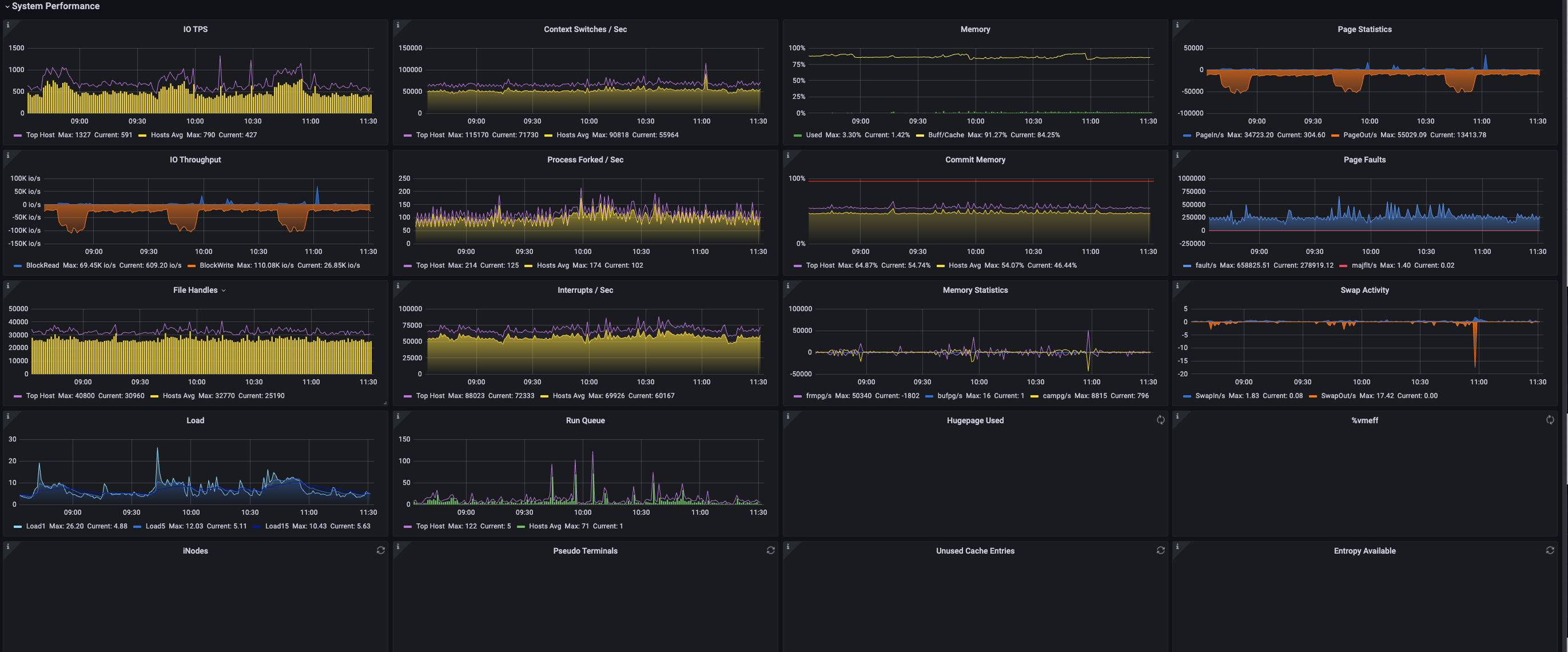
| Metric | Description | Unit | Level | Reference Alert Threshold |
|---|---|---|---|---|
| IO TPS | Total number of physical disk transfers per second. One transfer is an I/O request to a physical device. Multiple logical requests may be merged into one device I/O request. Data volume per transfer is not fixed | iops | ||
| Context Switches/Sec | Number of kernel context switches per second (maximum and average across hosts) | short | ||
| Memory | Used - Percentage of memory used Buff/Cache - Percentage of memory used for buffers and cache |
0-1 | ||
| Page Statistics | PageIn/s - Total size of pages read from disk per second PageOut/s - Total size of pages written to disk per second Note: On kernel versions 2.2.x and earlier, this value represents page count, not total size |
KB | ||
| IO Throughput | Read - Number of blocks read from disk per second Write - Number of blocks written to disk per second On kernel 2.4 and later, block equals sector (512 bytes). Block size is variable on earlier kernels |
iops | ||
| Process Forked/Sec | Number of processes forked per second | short | ||
| Commit Memory | Memory usage under current load. This value may exceed 100% due to kernel memory overcommitment | 0-1 | p3/p2 | Alert at 60%–80%; if OOM protection is not set, processes may be killed by OOM killer |
| Page Faults | fault/s - Number of page faults per second. Page faults do not necessarily trigger I/O, as some can be resolved without disk access majflt/s - Major page faults requiring loading pages from disk |
short | ||
| File Handles | Number of file handles used by the system | short | ||
| Interrupts/Sec | Number of interrupts per second | short | ||
| Memory Statistics | frmpg/s - Number of memory pages freed per second (negative values indicate pages allocated) bufpg/s - Additional pages used for buffers per second (negative values indicate fewer pages used) campg/s - Additional pages added to cache per second (negative values indicate less caching) Note: Page size may be 4KB or 8KB depending on architecture |
page | ||
| Swap Activity | Number of pages swapped in/out per second | page | ||
| Load | Load1 - 1-minute average system load. Represents average number of tasks in runnable, running, or uninterruptible sleep states Load5 - 5-minute average load Load15 - 15-minute average load |
short | p3/p2 | CPU cores × 3 / CPU cores × 5 |
| Run Queue | Length of the run queue (number of tasks waiting to run). Purple shows maximum across all hosts, Green shows average | short | ||
| Hugepage Used | Hugepage memory usage | 0-1 | ||
| %vmeff | Ratio of pages reclaimed to pages scanned. A higher value means most scanned pages are reclaimed. 100% means every scanned page is reclaimed. A low value (<30%) indicates difficulty freeing memory. 0 means no pages were scanned. Ideal values are 0 or 100% | 0-1 | ||
| iNodes | Number of inode handles used by the system | short | p3 | |
| Pseudo Terminals | Number of pseudo-terminals used by the system | short | ||
| Unused Cache Entries | Number of unused entries in directory cache (Pink shows minimum across hosts, Yellow shows average) | short | ||
| Entropy Available | The system collects "true" randomness from various events (e.g., network activity, hardware RNGs) and feeds it into the kernel entropy pool used by /dev/random. High-security applications often use /dev/random as their entropy source. If /dev/random runs out of entropy, it blocks until more randomness is available, potentially halting dependent applications | short |
The YMatrix Database interface includes two sections: Database Performance and Storage.
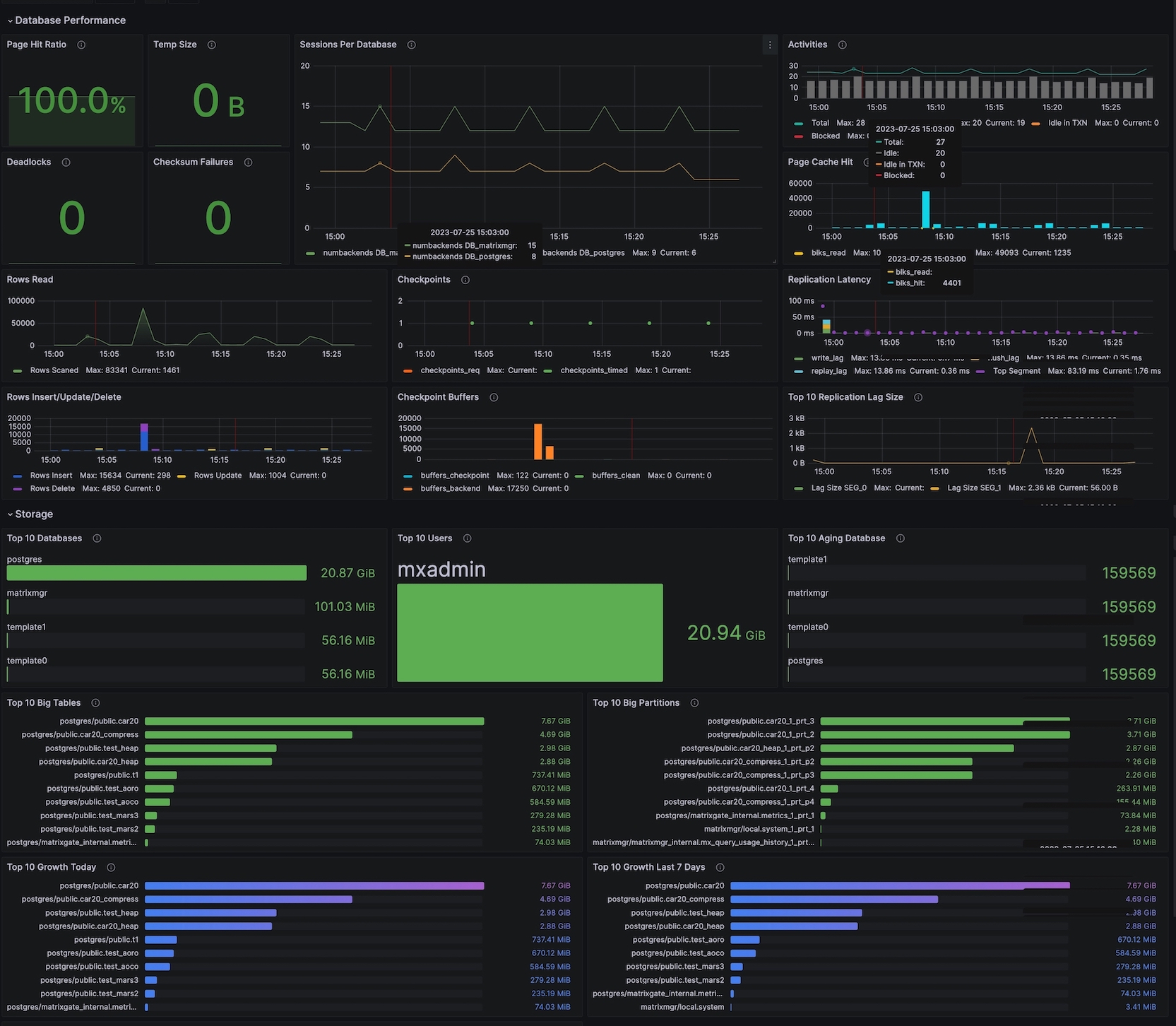
This section displays database performance metrics, including:
| Metric | Description | Unit | Level | Reference Alert Threshold |
|---|---|---|---|---|
| Page Hit Ratio | Ratio of HEAP table read operations that hit the block cache to total read operations. (Cache includes only the HEAP table's internal cache, not OS cache.) Displayed value is current; curve shows historical values Typically should be above 90% |
0-1 | ||
| Temp Size | Total volume of data written to temporary files by queries. All temporary files are counted regardless of the reason for creation or log_temp_files setting | bytes | ||
| Sessions Per Database | Number of sessions per database | short | p2/p1 | Alert at 60% and 80% of max connections |
| Activities | Number of sessions in various states | short | ||
| Deadlocks | Number of deadlocks detected | short | Alert if greater than 0 | |
| Checksum Failures | Number of database page checksum failures. NULL if not enabled | short | p3 | |
| Rows Read | Number of data rows read | short | ||
| Checkpoints | Checkpoint statistics.Orange indicates checkpoints triggered by explicit requests, Green indicates automatic checkpoints due to timeout | short | ||
| Page Cache Hit | blks_hit: Number of cache hits during data page reads blks_read: Number of disk reads due to cache misses |
|||
| Replication Latency | write_lag - Time between local WAL flush and Standby/Mirror acknowledging receipt (but not yet flushed or applied). When Standby/Mirror is configured, measures commit delay when synchronous_commit is set to remote_write flush_lag - Time between local WAL flush and Standby/Mirror acknowledging flush (but not yet applied). Measures commit delay when synchronous_commit is set to on replay_lag - Time between local WAL flush and Standby/Mirror acknowledging replay (fully applied). Measures commit delay when synchronous_commit is set to remote_apply |
milliseconds (ms) | p3 | Recommended threshold: 10s High replication lag may slow down write transactions |
| Rows Insert/Update/Delete | Row operation statistics Rows Insert: Number of inserted rows Rows Update: Number of updated rows Rows Delete: Number of deleted rows |
short | ||
| Checkpoint buffers | buffers_checkpoint - Number of buffers written during checkpoint buffers_clean - Number of buffers written by background writer buffers_backend - Number of buffers written directly by backend processes |
short | ||
| Top 10 Replication Lag Size | Top 10 WAL sizes by replication lag | bytes | p3 | 1GB |
This section displays storage-related statistics, including:
| Metric | Description | Unit | Level | Reference Alert Threshold |
|---|---|---|---|---|
| Top 10 Database | Top 10 largest databases by size | bytes | ||
| Top 10 Users | Top 10 users by data volume | bytes | ||
| Top 10 Aging Database | Top 10 databases by age. Databases with age exceeding 2 billion may become unusable | short | p2 | 1500000000 |
| Top 10 Big Tables | Top 10 largest tables by size | bytes | ||
| Top 10 Big Partitions | Top 10 largest partitions by size | bytes | ||
| Top 10 Growth Today | Top 10 tables with highest data growth today | bytes | ||
| Top 10 Growth Last 7 Days | Top 10 tables with highest data growth over the last 7 days | bytes |


