This document introduces the storage engines supported by MatrixDB and the storage diagnostic tool datainspect. It covers the following topics:
A storage engine is the foundation of a database system's data persistence layer. The database performs operations such as create, query, update, and delete based on the underlying storage engine. Different storage engines provide distinct mechanisms for data storage, designed across various dimensions including physical layout, index types, and lock granularity.
Currently, MatrixDB supports the following storage engines:
The HEAP table uses the traditional PostgreSQL heap storage engine, also known as a heap table. It supports high-concurrency read/write operations, transactions, indexes, and other features.
The MARS2 table improves query performance by reducing I/O seek operations through physically ordered merging. It supports compression, columnar storage, automatic archiving, pre-aggregation, and excels in time-series scenarios.
Note: MARS2 does not currently support UPDATE or DELETE operations.
Based on the characteristics of each storage engine, you can flexibly choose the appropriate engine according to your use case. Below are examples for creating tables using different engines.
HEAP is the default storage engine in MatrixDB. If no storage engine is explicitly specified during table creation, a HEAP table will be created by default.
=# CREATE TABLE disk(
    time timestamp with time zone,
    tag_id int,
    read float,
    write float
)
DISTRIBUTED BY (tag_id);The MARS2 table depends on the matrixts time-series extension. Before creating a MARS2 table, you must first install this extension in the target database.
Note!
Thematrixtsextension is database-level. You only need to create it once per database; do not recreate it repeatedly.
=# CREATE EXTENSION matrixts;Use the USING MARS2 clause when creating the table to specify the MARS2 storage engine:
=# CREATE TABLE vehicle_basic_data_mars2(
  daq_time timestamp  encoding (minmax),
  vin varchar(32)  COLLATE "C" encoding (minmax),
  lng float encoding (minmax),
  lat float encoding (minmax),
  speed float ,
  license_template varchar(16) ,
  flag integer
)
USING MARS2
WITH (compresstype=zstd, compresslevel=3)
DISTRIBUTED BY (vin)
PARTITION BY RANGE (daq_time)
( START ('2022-07-01 00:00:00') INCLUSIVE
  END ('2022-08-01 00:00:00') EXCLUSIVE
  EVERY (INTERVAL '1 day')
,DEFAULT PARTITION others );
Below is an explanation of key parameters and clauses used in the vehicle_basic_data_mars2 statement:
encoding (minmax)
This option enhances query performance for aggregate functions such as min, max, avg, sum, count, or filtering with WHERE. Use this option selectively based on business needs. Avoid applying it to all columns indiscriminately, as it may increase unnecessary CPU and I/O overhead during data writes.
COLLATE "C"
Apply this only to device ID fields. It improves sorting and query performance for text-type columns.
USING MARS2
This is the required syntax to specify the MARS2 storage engine. Do not modify this clause.
WITH (compresstype=zstd, compresslevel=3)
Specifies Zstandard (zstd) as the compression algorithm. Other supported algorithms include rle_type, zlib, and lz4. We recommend using zstd with a compression level of 3. See the table below for detailed compression parameters.
DISTRIBUTED BY (vin)
Specifies the distribution key. We recommend using 设备编码字段 as the distribution key to enable efficient queries on data from the same device, minimizing inter-node data redistribution costs.
PARTITION BY RANGE (daq_time)
Defines the partitioning key. We recommend using 设备采集数据的时间 as the partition key because most queries filter by data collection time. For example, if you want to analyze one day's worth of data, adding a filter like WHERE daq_time >= CURRENT_DATE - INTERVAL '1 day' allows the database to quickly locate the relevant partition and retrieve data efficiently.
( START ('2022-07-01 00:00:00') INCLUSIVE END ('2022-08-01 00:00:00') EXCLUSIVE EVERY (INTERVAL '1 day'), DEFAULT PARTITION others);
This clause creates subpartitions starting from 2022-07-01 00:00:00 to 2022-08-01 00:00:00, using the START...END keyword along with INCLUSIVE and EXCLUSIVE.
EVERY (INTERVAL '1 day')
Sets the time interval between partitions to 1 days. Besides day, you can also use hour, month, or year, depending on your data volume. For instance:
1 day as the interval.1 month is suitable.1 year is sufficient.DEFAULT PARTITION others
This defines a default partition. Data whose timestamp does not fall into any defined range will be stored here.
Note!
While we encourage following these recommendations, avoid blindly copying them. Time-series use cases vary widely—always analyze your specific scenario before finalizing the design.
Compression parameters for MARS2 tables:
| Parameter | Default | Min | Max | Description |
|---|---|---|---|---|
| compress_threshold | 1200 | 1 | 8000 | Compression threshold. Controls how many tuples trigger a compression operation. Represents the maximum number of tuples in a single compression unit. |
| compresstype | lz4 | — | — | Compression algorithm. Supported values: 1. zstd 2. zlib 3. lz4 |
| compresslevel | 1 | 1 | — | Compression level. Higher values yield better compression ratios but slower speed. Valid ranges vary by algorithm: zstd: 1–19 zlib: 1–9 lz4: 1–20 |
Note!
Generally, higher compression levels result in better compression ratios but slower performance. However, this is not always strictly true.
After successfully creating a MARS2 table, you must create a mars2_btree index to enable normal data reads and writes. The purpose of indexing is to co-locate data with similar dimensions or attributes in physical storage, reducing I/O seeks and improving query efficiency. Therefore, choose sort keys that align with your primary query patterns.
For example:
(vin)) as the sort key.(vin,daq_time)) as sort keys.=# CREATE INDEX idx_mars2 ON vehicle_basic_data_mars2
USING mars2_btree(vin, daq_time);Note!
When multiple batches of data arrive for the same device at the same time point, MARS2 can merge them. To enable merging, you must manually specifyuniquemode=truewhen creating the index, as its default value isfalse. For example:
- With
uniquemode=true, if deviceA01reports3records at time2022-01-01 00:00:00, only the last record is retained (previous ones are overwritten).- With the default setting
uniquemode=false, all3records from deviceA01at time2022-01-01 00:00:00are preserved without deduplication.
datainspect is a built-in storage diagnostic tool for MARS2. It provides low-level insights into physical storage, enabling precise optimization of data storage and query performance.
Storage optimization requires understanding how data is laid out in physical files. Similar to PostgreSQL’s pageinspect, datainspect allows easy extraction and analysis of data segments within MARS2 storage. Additionally, it integrates index and metadata information such as NULL distribution and min/max values to help optimize I/O scanning.
Note!
This tool applies only to MARS2 tables.
datainspect consists of internal system functions included with MARS2. Once MARS2 is properly installed, these functions are available. Since MARS2 relies on the matrixts time-series extension, you must first create the extension in the target database.
Note!
Thematrixtsextension is database-level. Create it once per database; no need to repeat.
=# CREATE EXTENSION matrixts;First, create a test table named tb1 to demonstrate the three main functions.
=# CREATE TABLE tb1(
    f1 int8 encoding(minmax),
    f2 int8 encoding(minmax),
    f3 float8 encoding(minmax),
    f4 text
) USING MARS2;
Create a MARS2 index:
=# CREATE INDEX ON tb1 USING mars2_btree(f1);Insert 24,000 test records:
=# INSERT INTO tb1 SELECT
            generate_series(1, 24000),
            mod((random()*1000000*(generate_series(1, 1200)))::int8, (random()::int8/100 + 100)),
            (random() * generate_series(1, 24000))::float8,
(random() * generate_series(1, 24000))::text;The desc_ranges function exposes MARS2’s internal metadata and index structures, providing information such as min/max values and null distribution. It also enables precise monitoring of physical storage usage.
Syntax
SELECT <* / column1,column2,...> FROM matrixts_internal.desc_ranges(<tablename TEXT>)Parameters
tablename: Name of the table. For partitioned tables, use the parent table name. (Required)Returns
| Field | Description |
|---|---|
| segno | Segment ID, starting from 0 |
| attno | Attribute number (column ID), starting from 0 |
| forkno | Physical file fork ID. Corresponds to a specific file at the storage layer, starting from the first fork |
| offno | Byte offset of the RANGE within the physical file. Starts from 0. In MARS2, data is written in batches. Each batch forms a RANGE upon reaching the configured compress_threshold (compression threshold) |
| nbytes | Actual size in bytes occupied by the RANGE |
| nrows | Number of rows per RANGE, determined by the compress_threshold setting (default 1200). Also known as the compression threshold—the maximum number of tuples compressed together |
| nrowsnotnull | Count of non-null values in the RANGE |
| mmin | Minimum value in the RANGE for columns with minmax encoding; NULL otherwise |
| mmax | Maximum value in the RANGE for columns with minmax encoding; NULL otherwise |
=# SELECT attno, sum(nbytes)/1024 as "Size in KB"
    FROM matrixts_internal.desc_ranges('tb1') GROUP BY attno ORDER BY attno;
 attno |      Size in KB
-------+----------------------
     0 |  94.9062500000000000
     1 |   7.8203125000000000
     2 | 187.3437500000000000
     3 | 386.3515625000000000
(4 rows)=# SELECT * FROM matrixts_internal.desc_ranges('tb1') WHERE segno = 1;
segno | attno | forkname | forkno | offno | nbytes | nrows | nrowsnotnull | mmin | mmax
-------+-------+----------+--------+--------+--------+-------+--------------+--------------------+--------------------
1 | 0 | data1 | 304 | 0 | 4848 | 1200 | 1200 | 15 | 7240
1 | 1 | data1 | 304 | 16376 | 856 | 1200 | 199 | 0 | 99
1 | 2 | data1 | 304 | 17712 | 9072 | 1200 | 1200 | 1.4602231817218758 | 704.8010557110921
1 | 3 | data1 | 304 | 50024 | 20272 | 1200 | 1200 | NULL | NULL
1 | 0 | data1 | 304 | 4848 | 4856 | 1200 | 1200 | 7243 | 14103
1 | 1 | data1 | 304 | 17232 | 160 | 1200 | 0 | NULL | NULL
1 | 2 | data1 | 304 | 26784 | 9760 | 1200 | 1200 | 705.0931003474365 | 1372.9018354549075
1 | 3 | data1 | 304 | 70296 | 19680 | 1200 | 1200 | NULL | NULL
1 | 0 | data1 | 304 | 9704 | 4856 | 1200 | 1200 | 14125 | 21417
1 | 1 | data1 | 304 | 17392 | 160 | 1200 | 0 | NULL | NULL
1 | 2 | data1 | 304 | 36544 | 9760 | 1200 | 1200 | 1375.043496121433 | 2084.906658862494
1 | 3 | data1 | 304 | 89976 | 19792 | 1200 | 1200 | NULL | NULL
1 | 0 | data1 | 304 | 14560 | 1816 | 445 | 445 | 21429 | 23997
1 | 1 | data1 | 304 | 17552 | 160 | 445 | 0 | NULL | NULL
1 | 2 | data1 | 304 | 46304 | 3720 | 445 | 445 | 2086.0748374078717 | 2336.065046118657
1 | 3 | data1 | 304 | 109768 | 7576 | 445 | 445 | NULL | NULL
(16 rows)The show_range function retrieves a segment of raw physical data from MARS2 and presents it in human-readable format. Currently supported data types: int2, int4, int8, float4, float8, timestamp, date, text.
Syntax
SELECT <* / column1,column2,...> FROM matrixts_internal.show_range(
 tablename text,
 attno int4,
 forkno int4,
 offno int4,
 nbytes int4
)
Parameters
tablename: Table name. For partitioned tables, use the partitioned table name. (Required)attno: Column number, starting from 0. (Required)forkno: Fork ID of the physical file. (Required)offno: Byte offset of the data in the physical file. (Required)nbytes: Size in bytes of the data segment. (Required)Note!
Refer to the return values of thedesc_rangesfunction above for parameter details.
| Field | Description |
|---|---|
| rowno | Row number relative to the RANGE (not absolute position in the entire table) |
| val | Actual data value |
Note!
Displayed floating-point values (val) may have precision errors.
=# SELECT * FROM matrixts_internal.show_range('tb1', 1, 304, 16176, 808) LIMIT 20;
 rowno | val
-------+-----
     1 | 4
     2 | 36
     3 | 81
     4 | 58
     5 | 17
     6 | 75
     7 | 11
     8 | 84
     9 | 60
    10 | 78
    11 | 69
    12 | 0
    13 | 87
    14 | 40
    15 | 72
    16 | 58
    17 | 17
    18 | 48
    19 | 70
    20 | 6
(20 rows)The dump_range function decompresses and exports selected physical data from MARS2 into a binary file for further analysis.
Syntax
=# SELECT <* / column1,column2,...> FROM matrixts_internal.dump_ranges(
tablename text,
attno int4,
outfile text,
forkno int4,
offno int4,
limits int4
);
Parameters
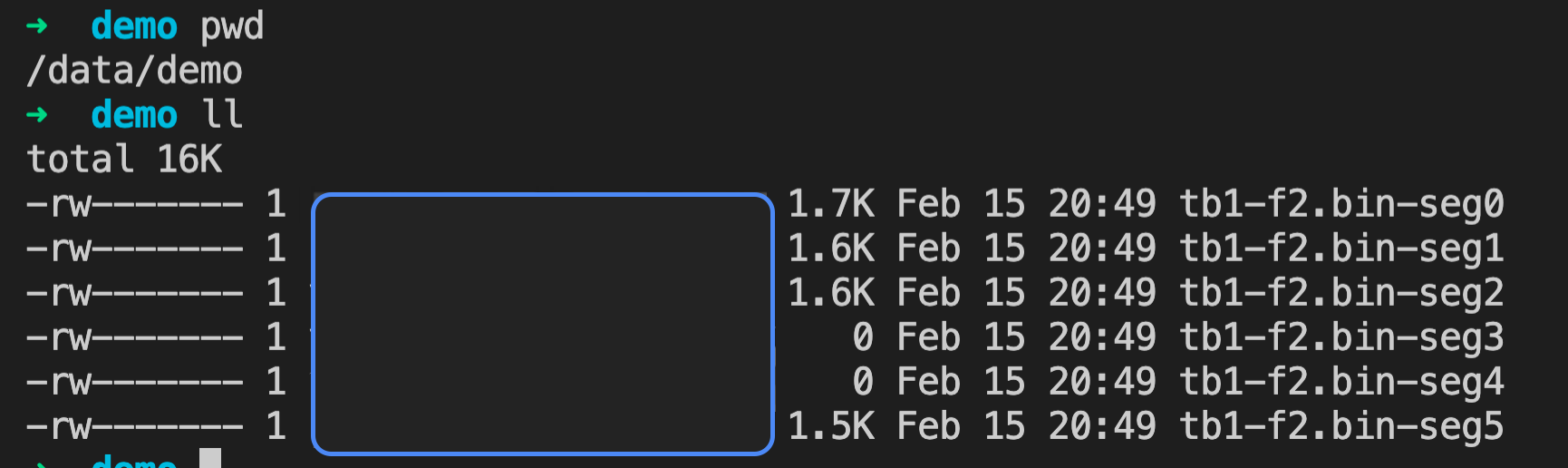
tablename: Table name. For partitioned tables, use the child partition name. (Required)attno: Column number. (Required)outfile: Output file path. After export, each Segment appends a unique suffix. For example, if the file is named tb1-f2.bin, Segment 1 saves it as tb1-f2.bin-seg1. (Required)forkno: Fork ID. (Optional)offno: Byte offset in the physical file. (Optional)limits: Maximum number of RANGES to export, starting from the specified forkno and offno. Defaults to 100. (Optional)Note!
Thelimitsparameter restricts the number of exported RANGES per Segment.
Note!
See the return description of thedesc_rangesfunction for parameter context.
Returns
nbytes: Amount of data exported from each Segment node, in bytes.Example
=# SELECT * FROM matrixts_internal.dump_ranges('tb1', 1, '/data/demo/tb1-f2.bin', 304, 16176, 1) LIMIT 20;
 nbytes
--------
      0
      0
   1480
   1632
   1704
   1592
(6 rows)
In this example, six results are returned because the export runs independently on each Segment. Each row represents the output from one Segment. Two entries show nbytes =0`` because those Segments contain no data matching the filter criteria.
After execution, each Segment host generates a binary file with an appended unique suffix (.-seg<no>).