This document describes the main features of MatrixGate.
Note!
For programming language integration with MatrixGate, see Data Ingestion - Connect Programming Languages to MatrixGate.
demo in the csvtable database.demo=# CREATE TABLE csvtable (
time TIMESTAMP WITH TIME ZONE,
tagid INT,
c1 INT,
c2 INT,
c3 INT
)
USING MARS3
DISTRIBUTED BY (tagid)
ORDER BY (time,tagid);Edit the data file data.csv with the following content:
1603777821|1|101|201|301
1603777822|2|102|202|302
1603777823|3|103|203|303
Start mxgate, setting --source to stdin, target table as the existing csvtable, and parallelism level to 2. In this example, the host is mdw.
[mxadmin@mdw ~]$ mxgate \
--source stdin \
--db-database demo \
--db-master-host 127.0.0.1 \
--db-master-port 5432 \
--db-user mxadmin \
--time-format unix-second \
--delimiter "|" \
--target csvtable \
--parallel 2 < data.csv
Connect to the database and verify successful data load.
demo=# SELECT * FROM csvtable ;
          time          | tagid | c1  | c2  | c3
------------------------+-------+-----+-----+-----
 2020-10-27 05:50:23+08 |     3 | 103 | 203 | 303
 2020-10-27 05:50:22+08 |     2 | 102 | 202 | 302
 2020-10-27 05:50:21+08 |     1 | 101 | 201 | 301

(3 rows)Create the table.
demo=# CREATE TABLE json_test(
     id int,
     j json
     )
     USING MARS3
     ORDER BY (id);
Create the data file.
~/json.csv
1|"{""a"":10, ""b"":""xyz""}"Load data
Use stdin mode as an example; other modes are similar.
The key is --format csv.
[mxadmin@mdw ~]$ mxgate \
--source stdin \
--db-database postgres \
--db-master-host 127.0.0.1 \
--db-master-port 7000 \
--db-user mxadmin \
--time-format raw \
--format csv \
--delimiter "|" \
--target json_test < ~/json.csv
Check loaded data.
demo=# SELECT * FROM json_test;
id |           j
----+-----------------------
1 | {"a":10, "b":"xyz"}
(1 row)Create the table.
demo=# CREATE TABLE json_array_test(
     id int,
     j json
     )
     USING MARS3
     ORDER BY (id);
Create the data file
~/json_array.csv.
1|"{""{\""a\"":10, \""b\"":\""xyz\""}"",""{\""c\"": 10}""}"Load with mxgate.
[mxadmin@mdw ~]$ mxgate \
--source stdin \
--db-database postgres \
--db-master-host 127.0.0.1 \
--db-master-port 7000 \
--db-user mxadmin \
--time-format raw \
--format csv \
--delimiter "|" \
--target json_array_test < ~/json_array.csv
Verify the result.
demo=# SELECT * FROM json_array_test ;
id |                      j
----+---------------------------------------------
1 | {"{\"a\":10, \"b\":\"xyz\"}","{\"c\": 10}"}
(1 row)
Note!
Because JSON columns contain special characters such as quotes, the --format parameter of mxgate must be set to CSV.
watch is a subcommand of mxgate that reports a series of metrics describing the runtime status of the mxgate daemon.
watch supports two modes:
[mxadmin@mdw ~]$ mxgate watchCollects mxgate runtime metrics every three seconds. Sample output:
                 Time          WCount          ICount        WSpeed/s        ISpeed/s  WBandWidth MB/S     BlocakItems
  2022-04-28 15:20:58        14478858        14527011         2598081         2627887            2395               0
  2022-04-28 15:21:01        22231035        22633254         2584059         2702081            2222               0
  2022-04-28 15:21:04        30494310        30500874         2754425         2622540            3551               0
  2022-04-28 15:21:07        38004210        38032956         2503300         2510694            2862               0
  2022-04-28 15:21:10        46188696        46298223         2728162         2755089            2227               0
  ...
Use the --info parameter to get descriptions of each metric:
[mxadmin@mdw ~]$ mxgate watch --infoBy default, only speed metrics are displayed. Use the --watch-latency parameter to monitor latency metrics for troubleshooting:
[mxadmin@mdw ~]$ mxgate watch --watch-latency[mxadmin@mdw ~]$ mxgate watch --historyCalculates the average ingestion speed per hour over the past 24 hours up to the current time. Example output:
                TIME RANGE                | SPEED/S  | BANDWIDTH MB/S  | BLOCK ITEMS
  2022-04-28 16:00:00-2022-04-28 17:00:00 |  2208010 |         1254.48 |           0
  2022-04-28 17:00:00-2022-04-28 18:00:00 |  1157920 |         1327.00 |           0
  2022-04-28 18:00:00-2022-04-28 19:00:00 |  2228666 |         2162.32 |           0
  2022-04-28 19:00:00-2022-04-28 20:00:00 |  1371092 |         2881.30 |           0
  2022-04-28 20:00:00-2022-04-28 21:00:00 |  1575320 |         2608.20 |           0
SPEED/S and BANDWIDTH MB/S represent the number of entries ingested per second and bandwidth in MB/s, respectively.
BLOCK ITEMS indicates the volume of data blocked in mxgate. This value increases when the database consumption rate cannot keep up with the data source (e.g., HTTP, Kafka) production rate.
You can use --watch-start, --watch-end, and --watch-duration to control the time range and interval for historical monitoring.
For example:
[mxadmin@mdw ~]$ mxgate watch --history --watch-start '2022-03-27 00:00:00' --watch-end '2022-04-27 00:00:00' --watch-duration '168h'This returns the average weekly (every 168 hours) ingestion speed from March 27 to April 27.
--watch-duration supports three units: h, m, and s.
mxgate supports modifying parallel loading parameters --stream-prepared and --interval without stopping the service:
--stream-prepared specifies the number of active slots used by mxgate when writing data to each table in YMatrix. By default, all tables have the same number of slots, but you can manually adjust it per job (each table allows only one job).--stream-prepared typically improves write concurrency and performance, but consumes more memory.--stream-prepared reduces memory usage on data segments (Segments), but may lower performance.--interval defines the working interval for each active slot. Each slot waits --interval milliseconds before sending accumulated data from mxgate to YMatrix.--interval increases write latency and batch size (provided data continuously flows into mxgate).--interval reduces latency and batch size.In practice, these two parameters should be tuned according to the storage engine and user requirements for data write latency.
Example usage:
$ mxgate set --stream-prepared-cli 3$ mxgate get --stream-prepared-get$ mxgate set --job-interval 200$ mxgate get --job-interval-getNote!
To set or get slot count or interval for a specific table, append--job <名称>to the above commands. Each job corresponds to one database table. The job parameter consists of schema name and table name. For example, if your table is namedtest_tablein thepublicschema, append--job public.test_tableto the command.
During data ingestion, evolving time-series data sources may render existing table schemas obsolete, necessitating schema modifications. This section explains how mxgate can pause data writes, reload table metadata, and resume writes without stopping the service. Steps:
mxgate pause -X command to suspend all table slots in preparation for schema changes. The -X parameter is required to disconnect mxgate from database slots. Schema changes cannot proceed unless slots are suspended. Additionally, using the -X parameter makes the pause command wait synchronously until all slots are suspended before returning.`-S`` $ mxgate pause -X
| \/ | | | _ () / _| | | __ | |\/| |/ `` | / \ | | | | (| | || | | |> <| || | (_| | || / || ||_,|_|| |//_\|\,_|\_| Version: v5.2.0 Your Copy is Licensed to: yMatrix.cn; 2023-10-26; any
begin to pause all jobs,please wait... ` | | '| \ \/ / | / ``
Note!
The new table schema can differ, but the table name must remain unchanged.
Finally, use the command to resume all table slots and reload table metadata. The `mxgate resume -R` parameter is required; `-R` and `resume` together complete the reload operation. `-R
$ mxgate resume -R
| \/ | | | _ () / _| | | __ | |\/| |/ `` | / \ | | | | (| | || | | |> <| || | (_| | || / || ||_,|_|| |//_\|\,_|\_| Version: v5.2.0 Your Copy is Licensed to: yMatrix.cn; 2023-10-26; any
begin to reload all jobs,please wait... ` | | '| \ \/ / | / ``
In cases where multiple mxgate processes are running, use the parameter to specify the process ID. All above commands support this, for example: `-p
$ mxgate get --job-interval-get -p 70199 --job
Note!
Reloading requires that all slots for the corresponding table in mxgate are paused first. Otherwise, you will see an error: ``
Note!
If the pause operation times out (after 50 seconds), the corresponding Slot's insert operations are canceled to ensure the pause completes successfully.
YMatrix implements UPSERT functionality in MatrixGate starting from v4.2.0. See Batched Data Merge (UPSERT).
YMatrix implements single table migration via MatrixGate starting from v4.3.0. See Single Table Migration.
Note!
YMatrix supports not only single table migration but also full database migration (v4.7.0 and later). See Full Database Migration.
Sometimes, debug logs are needed to inspect key mxgate behaviors. However, restarting mxgate to enable or disable debug logging is inconvenient for troubleshooting. Therefore, YMatrix provides dynamic log level adjustment:
jobs are not paused,please pause them first to enable the detailed mxgate set --log-level VERBOSE log level, or VERBOSE to enable the most verbose mxgate set --log-level DEBUG level. When debug logging is no longer needed, use DEBUG to revert the log level to mxgate set --log-level INFO.In some cases, DDL operations (e.g., TRUNCATE, ALTER) need to be executed on a table while mxgate is actively inserting data. This feature allows mxgate to "back off" ongoing inserts upon receiving a DDL command, ensuring the DDL executes promptly.
Supported DDL operations:
=# ALTER TABLE <tablename> ADD COLUMN <columnname> <columndatatype>;
=# ALTER TABLE <tablename> DROP COLUMN <columnname>;
=# ALTER TABLE <tablename> ALTER COLUMN <columnname> TYPE <columndatatype>;=# ALTER TABLE <tablename> RENAME TO <new tablename>;=# DROP TABLE <tablename>;
=# CREATE TABLE <tablename(column datatype)>;Typically, the stream-prepared parameter (number of parallel slot sessions) is manually tuned to match the load of different write tasks (i.e., incoming data volume). However, in some scenarios, write loads change dynamically and continuously, making manual tuning impractical.
Therefore, MatrixGate provides an auto-tuning mechanism: enable the `` parameter to automatically adapt to write load.
This feature can be enabled in several ways:
Note!
Enabling this feature ensures optimal write performance in real time, but may not yield the most efficient use of session slot resources.
Note!
If auto-tuning is enabled and a high-watermark threshold is set, auto-tuning only activates when the write load exceeds the threshold.
--- SPLIT ---
10 Percentage-Based Write Load Quantification in mxgate
mxgate supports quantifying the write load from the source system as a percentage (0–100%). During data ingestion, you can obtain the write load for a specific job using the following command:
$ mxgate get --source-pressure
******************************************************
 __  __       _        _       ____       _
|  \/  | __ _| |_ _ __(_)_  __/ ___| __ _| |_ ___
| |\/| |/ _  | __/ _ \
| |  | | (_| | |_| |  | |>  <| |_| | (_| | ||  __/
|_|  |_|\__,_|\__|_|  |_/_/\_\\____|\__,_|\__\___|
  Version: v5.2.0
  Your Copy is Licensed to: yMatrix.cn; 2023-10-26; any
******************************************************
public.t2 source-pressure = 27.26%
If multiple jobs exist, you can retrieve the write load for a specific job by name, or retrieve loads for multiple jobs at once:
$ mxgate get --source-pressure --job public.t2
******************************************************
 __  __       _        _       ____       _
|  \/  | __ _| |_ _ __(_)_  __/ ___| __ _| |_ ___
| |\/| |/ _  | __/ _ \
| |  | | (_| | |_| |  | |>  <| |_| | (_| | ||  __/
|_|  |_|\__,_|\__|_|  |_/_/\_\\____|\__,_|\__\___|
  Version: v5.2.0
  Your Copy is Licensed to: yMatrix.cn; 2023-10-26; any
******************************************************
public.t2 source-pressure = 15.73%
$ mxgate get --source-pressure
******************************************************
__ __ _ _ ____ _
| \/ | __ _| |_ _ __(_)_ __/ ___| __ _| |_ ___
| |\/| |/ _ | __/ _ \
| | | | (_| | |_| | | |> <| |_| | (_| | || __/
|_| |_|\__,_|\__|_| |_/_/\_\\____|\__,_|\__\___|
Version: v5.2.0
Your Copy is Licensed to: yMatrix.cn; 2023-10-26; any
******************************************************
public.t2 source-pressure = 35.84%
public.t1 source-pressure = 0%After quantifying the percentage-based load, you can use this metric to set a high-water mark threshold. If the source write load exceeds this threshold, the value is displayed in red. At this point, you can manually adjust the number of slots to reduce write pressure, or use the mxgate auto-tune slot feature.
Set the threshold using the following command:
$ mxgate set --high-water-mark <highwatermark> --job <jobname>Example:
$ mxgate set --high-water-mark 20 --job public.t2
******************************************************
 __  __       _        _       ____       _
|  \/  | __ _| |_ _ __(_)_  __/ ___| __ _| |_ ___
| |\/| |/ _  | __/ _ \
| |  | | (_| | |_| |  | |>  <| |_| | (_| | ||  __/
|_|  |_|\__,_|\__|_|  |_/_/\_\\____|\__,_|\__\___|
  Version: v5.2.0
  Your Copy is Licensed to: yMatrix.cn; 2023-10-26; any
******************************************************
public.t2 high-water-mark = 20.00%
Use the following command to retrieve the high-water mark for a specific job:
$ mxgate get --high-water-mark-get --job public.t2
******************************************************
 __  __       _        _       ____       _
|  \/  | __ _| |_ _ __(_)_  __/ ___| __ _| |_ ___
| |\/| |/ _  | __/ _ \
| |  | | (_| | |_| |  | |>  <| |_| | (_| | ||  __/
|_|  |_|\__,_|\__|_|  |_/_/\_\\____|\__,_|\__\___|
  Version: v5.2.0
  Your Copy is Licensed to: yMatrix.cn; 2023-10-26; any
******************************************************
public.t2 high-water-mark = 20.00%
$ mxgate get --high-water-mark-get
******************************************************
__ __ _ _ ____ _
| \/ | __ _| |_ _ __(_)_ __/ ___| __ _| |_ ___
| |\/| |/ _ | __/ _ \
| | | | (_| | |_| | | |> <| |_| | (_| | || __/
|_| |_|\__,_|\__|_| |_/_/\_\\____|\__,_|\__\___|
Version: v5.2.0
Your Copy is Licensed to: yMatrix.cn; 2023-10-26; any
******************************************************
public.t1 high-water-mark = 0.00%
public.t2 high-water-mark = 20.00%Note!
If the threshold is exceeded, the pressure value will be displayed in red.
If mxgate's auto-tune slot feature is enabled and a high-water mark is set, the number of slots will not increase automatically until the job's load exceeds the configured high-water mark—even if mxgate's auto-tune logic suggests an increase.
For example, if the high-water mark is set to 75, and the current load is 35.21, mxgate may determine that more slots are needed. However, because the load is below the threshold, slot count will not increase. Instead, the following warning appears:
[WARN]:-[SlotsLauncher] Sources pressure = 35.21 of job(public.t2) is lower than the high water mark(75), the slot increase is not allowedNote!
Example values are for reference only. Set the high-water mark based on actual business requirements and current data ingestion rates.
To disable the high-water mark limit, use the following command:
$ mxgate set --disable-high-water-mark=true --job public.t2
******************************************************
 __  __       _        _       ____       _
|  \/  | __ _| |_ _ __(_)_  __/ ___| __ _| |_ ___
| |\/| |/ _  | __/ _ \
| |  | | (_| | |_| |  | |>  <| |_| | (_| | ||  __/
|_|  |_|\__,_|\__|_|  |_/_/\_\\____|\__,_|\__\___|
  Version: v5.2.0
  Your Copy is Licensed to: yMatrix.cn; 2023-10-26; any
******************************************************
public.t2 high-water-mark = 0.00%You can query the matrixgate_internal.mxgate_process_view view in the matrixmgr database to view information about all mxgate processes currently or previously connected to the YMatrix database for data ingestion.
matrixmgr=# SELECT * from matrixgate_internal.mxgate_process_view;
 id |  pid   | host | port | source |    database     |      external_table_schema       | has_metrics |          created_at           |           exited_at           | exited | schema_cleaned |      mxgate_config       | updated_at
----+--------+------+------+--------+-----------------+----------------------------------+-------------+-------------------------------+-------------------------------+--------+----------------+--------------------------+------------
 13 |  63431 | sdw2 | 8891 | http   | kafka_gate_json | _matrixgate_63431_sdw2_b7b30959  | t           | 2024-04-03 16:45:27.789389+08 | 2024-04-03 16:45:27.981513+08 | t      | f              | {"metrics_interval": 10} |
 14 |  66038 | sdw2 | 8891 | http   | kafka_gate_json | _matrixgate_66038_sdw2_e810e04d  | t           | 2024-04-03 16:45:54.381101+08 | 2024-04-03 16:45:54.571016+08 | t      | f              | {"metrics_interval": 15} |
 15 |  98535 | sdw2 | 8891 | http   | kafka_gate_json | _matrixgate_98535_sdw2_b5032eff  | f           | 2024-04-03 16:49:50.540095+08 | 2024-04-03 16:49:50.753405+08 | t      | f              | {"metrics_interval": 15} |
 16 | 102059 | sdw2 | 8891 | http   | kafka_gate_json | _matrixgate_102059_sdw2_c0f9dbc4 | f           | 2024-04-03 16:50:30.544932+08 | 2024-04-03 16:50:30.749403+08 | t      | f              | {"metrics_interval": 15} |
 17 | 104761 | sdw2 | 8891 | http   | kafka_gate_json | _matrixgate_104761_sdw2_f284b2f2 | t           | 2024-04-03 16:50:40.909025+08 | 2024-04-03 16:50:41.10522+08  | t      | f              | {"metrics_interval": 10} |
 18 | 105109 | sdw2 | 8891 | http   | kafka_gate_json | _matrixgate_105109_sdw2_9ffa1360 | f           | 2024-04-03 16:50:42.324334+08 | 2024-04-03 16:50:42.501187+08 | t      | f              | {"metrics_interval": 15} |
 19 | 110590 | sdw2 | 8891 | http   | kafka_gate_json | _matrixgate_110590_sdw2_527394f9 | f           | 2024-04-03 16:51:28.265894+08 | 2024-04-03 16:51:28.468763+08 | t      | f              | {"metrics_interval": 0}  |
 20 | 110760 | sdw2 | 8891 | http   | kafka_gate_json | _matrixgate_110760_sdw2_c7d787a3 | t           | 2024-04-03 16:51:29.730855+08 | 2024-04-03 16:51:29.957642+08 | t      | f              | {"metrics_interval": 10} |
 21 | 110882 | sdw2 | 8891 | http   | kafka_gate_json | _matrixgate_110882_sdw2_6bdbd471 | f           | 2024-04-03 16:51:31.189347+08 | 2024-04-03 16:51:31.383211+08 | t      | f              | {"metrics_interval": 15} |
 22 | 112484 | sdw2 | 8891 | http   | kafka_gate_json | _matrixgate_112484_sdw2_83dc4c87 | f           | 2024-04-03 16:51:47.735186+08 | 2024-04-03 16:51:47.943989+08 | t      | f              | {"metrics_interval": 0}  |
 23 | 112608 | sdw2 | 8891 | http   | kafka_gate_json | _matrixgate_112608_sdw2_ebd6fcb1 | t           | 2024-04-03 16:51:49.202759+08 | 2024-04-03 16:51:49.413013+08 | t      | f              | {"metrics_interval": 10} |
 24 | 112746 | sdw2 | 8891 | http   | kafka_gate_json | _matrixgate_112746_sdw2_804d4e9c | f           | 2024-04-03 16:51:50.651448+08 | 2024-04-03 16:51:50.82829+08  | t      | f              | {"metrics_interval": 15} |
 25 | 114206 | sdw2 | 8891 | http   | kafka_gate_json | _matrixgate_114206_sdw2_1376e4f0 | f           | 2024-04-03 16:52:05.954983+08 | 2024-04-03 16:52:06.150763+08 | t      | f              | {"metrics_interval": 0}  |
 26 | 114323 | sdw2 | 8891 | http   | kafka_gate_json | _matrixgate_114323_sdw2_31f5fe71 | t           | 2024-04-03 16:52:07.392493+08 | 2024-04-03 16:52:07.606231+08 | t      | f              | {"metrics_interval": 10} |
 27 | 114454 | sdw2 | 8891 | http   | kafka_gate_json | _matrixgate_114454_sdw2_84a2439d | f           | 2024-04-03 16:52:08.849134+08 | 2024-04-03 16:52:09.044388+08 | t      | f              | {"metrics_interval": 15} |
 28 | 118611 | sdw2 | 8891 | http   | kafka_gate_json | _matrixgate_118611_sdw2_11aa241a | f           | 2024-04-03 16:54:08.596567+08 | 2024-04-03 16:54:08.806036+08 | t      | f              | {"metrics_interval": 0}  |
 29 | 118754 | sdw2 | 8891 | http   | kafka_gate_json | _matrixgate_118754_sdw2_9c835dfc | t           | 2024-04-03 16:54:10.04123+08  | 2024-04-03 16:54:10.28288+08  | t      | f              | {"metrics_interval": 10} |
 30 | 118879 | sdw2 | 8891 | http   | kafka_gate_json | _matrixgate_118879_sdw2_d58b7ed2 | f           | 2024-04-03 16:54:11.521661+08 | 2024-04-03 16:54:11.72412+08  | t      | f              | {"metrics_interval": 15} |
(18 rows)
Alternatively, use the following command:
$ mxgate get mxgate-process-info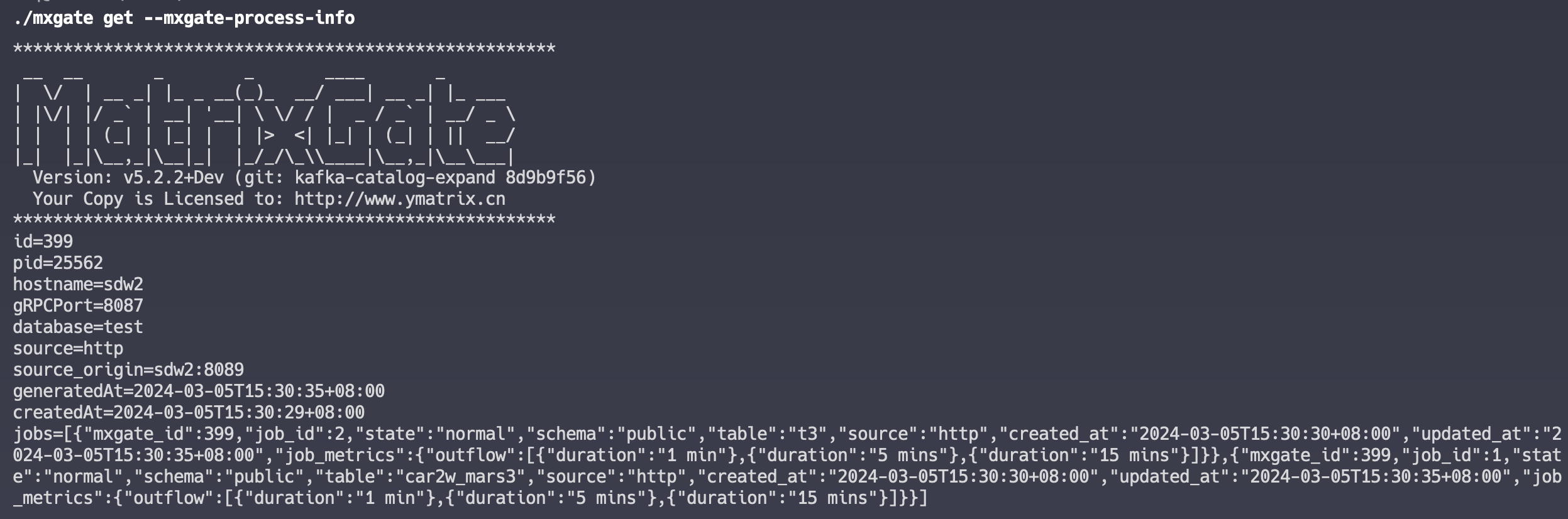
Parameter Description:
| Parameter | Description |
|---|---|
| id | Auto-increment ID |
| pid | mxgate process PID |
| host | Hostname of the server where mxgate runs |
| port | Port number of the gRPC service exposed by mxgate |
| created_at | Time when the mxgate process was created. This timestamp does not update after startup |
| exited | Indicates whether the mxgate process has exited. Normally, this is f while running. If the process exits normally (e.g., via Ctrl+C or mxgate stop), it becomes t. If the process terminates abnormally (e.g., killed or host offline), this field may remain f because mxgate cannot update it before termination |
| schema_cleaned | Indicates whether the external schema used by mxgate has been cleaned up. While running, this is f. After normal exit, it becomes t within seconds. For abnormal exits, cleanup may not occur immediately. YMatrix internally tracks mxgate heartbeat; if no heartbeat is received for over 2 hours, the schema is removed and this field becomes t |
| database | Database connected by mxgate |
| source | Data source type (stdin, http, grpc, transfer) |
| updated_at | Updated every 3 seconds by the mxgate process. This reflects the last update time on the YMatrix Master. After normal exit, this value stops updating |
| has_metrics | Indicates whether the internal metrics collection module is active. If f, the mxgate get metrics command returns no data |
| external_table_schema | Schema name used for external tables created by mxgate. Used to clean up residual schemas after abnormal exits |
| mxgate_config | Stores key configuration fields from the mxgate config file, allowing configuration review after process exit (supported from v5.3.2) |
Currently, all mxgate data sources (stdin, http, grpc, transfer) support statistics in the insert catalog and error log tables:
INSERT operation (success, partial success, or failure) per mxgate slot.View the insert catalog table:
=# SELECT * FROM matrixgate_internal.insert_catalog;
 id | mxgate_id | insert_sequence | slot_id | session_id |       created_at       | status  | source | flows_cnt | total_lines | bytes_length |                          target_table                           |        message        | job_id
----+-----------+-----------------+---------+------------+------------------------+---------+--------+-----------+-------------+--------------+-----------------------------------------------------------------+-----------------------+--------
  3 |        39 |               1 |      10 |     152832 | 2024-03-15 13:17:32+08 | partial | http   |        10 |         100 |          600 | "public"."concurrent_insert_error_log_varification_http_source" | 20 malformed messages |      1
(1 row)
Parameter Description:
| Parameter | Description |
|---|---|
| id | Auto-increment ID |
| mxgate_id | mxgate process ID, corresponds to the id in mxgate_process_view |
| insert_sequence | Sequence number of the insert operation. Increments by 1 for each insert per slot |
| slot_id | ID of the slot performing the insert |
| session_id | Session ID of the connection between mxgate (as client) and the database |
| created_at | Timestamp when this insert record was created |
| status | Insert status: success, partial, or failed |
| source | mxgate data source type |
| flows_cnt | Number of batches in this insert |
| total_lines | Total number of rows inserted |
| bytes_length | Total data size in bytes |
| target_table | Target table for data ingestion |
| message | Error message if insertion failed |
| job_id | Job ID, formatted as <schema>.<table> |
View the error log table:
=# SELECT * FROM matrixgate_internal.insert_error_log;
 catalog_id |       created_at       |      received_at       | line_number |                          errmsg                           | rawdata
------------+------------------------+------------------------+-------------+-----------------------------------------------------------+----------
          3 | 2024-03-15 13:17:32+08 | 2024-03-15 13:17:31+08 |           6 | invalid input syntax for type integer: "error", column id | error|c5
          3 | 2024-03-15 13:17:32+08 | 2024-03-15 13:17:31+08 |           9 | invalid input syntax for type integer: "error", column id | error|c8
          3 | 2024-03-15 13:17:32+08 | 2024-03-15 13:17:31+08 |           6 | invalid input syntax for type integer: "error", column id | error|c5
          3 | 2024-03-15 13:17:32+08 | 2024-03-15 13:17:31+08 |           9 | invalid input syntax for type integer: "error", column id | error|c8
          3 | 2024-03-15 13:17:32+08 | 2024-03-15 13:17:31+08 |           6 | invalid input syntax for type integer: "error", column id | error|c5
          3 | 2024-03-15 13:17:32+08 | 2024-03-15 13:17:31+08 |           9 | invalid input syntax for type integer: "error", column id | error|c8
          3 | 2024-03-15 13:17:32+08 | 2024-03-15 13:17:31+08 |           6 | invalid input syntax for type integer: "error", column id | error|c5
          3 | 2024-03-15 13:17:32+08 | 2024-03-15 13:17:31+08 |           9 | invalid input syntax for type integer: "error", column id | error|c8
          3 | 2024-03-15 13:17:32+08 | 2024-03-15 13:17:31+08 |           6 | invalid input syntax for type integer: "error", column id | error|c5
          3 | 2024-03-15 13:17:32+08 | 2024-03-15 13:17:31+08 |           9 | invalid input syntax for type integer: "error", column id | error|c8
          3 | 2024-03-15 13:17:32+08 | 2024-03-15 13:17:31+08 |           6 | invalid input syntax for type integer: "error", column id | error|c5
          3 | 2024-03-15 13:17:32+08 | 2024-03-15 13:17:31+08 |           9 | invalid input syntax for type integer: "error", column id | error|c8
          3 | 2024-03-15 13:17:32+08 | 2024-03-15 13:17:31+08 |           6 | invalid input syntax for type integer: "error", column id | error|c5
          3 | 2024-03-15 13:17:32+08 | 2024-03-15 13:17:31+08 |           9 | invalid input syntax for type integer: "error", column id | error|c8
          3 | 2024-03-15 13:17:32+08 | 2024-03-15 13:17:31+08 |           6 | invalid input syntax for type integer: "error", column id | error|c5
          3 | 2024-03-15 13:17:32+08 | 2024-03-15 13:17:31+08 |           9 | invalid input syntax for type integer: "error", column id | error|c8
          3 | 2024-03-15 13:17:32+08 | 2024-03-15 13:17:31+08 |           6 | invalid input syntax for type integer: "error", column id | error|c5
          3 | 2024-03-15 13:17:32+08 | 2024-03-15 13:17:31+08 |           9 | invalid input syntax for type integer: "error", column id | error|c8
          3 | 2024-03-15 13:17:32+08 | 2024-03-15 13:17:31+08 |           6 | invalid input syntax for type integer: "error", column id | error|c5
          3 | 2024-03-15 13:17:32+08 | 2024-03-15 13:17:31+08 |           9 | invalid input syntax for type integer: "error", column id | error|c8
(20 rows)
Parameter Description:
| Parameter | Description |
|---|---|
| catalog_id | Auto-increment ID, corresponds to id in the insert catalog table |
| created_at | Timestamp when this record was created |
| received_at | Timestamp when mxgate received this data |
| line_number | Line number of the data |
| errmsg | Error message |
| rawdata | Raw input data |
Note!
If an entire batch fails during a single insert operation, only onefailedentry is recorded in theinsert_catalogtable. Individual error tuples are not logged in theinsert_error_logtable.


